Request Identity Verification for SASSA R350 WhatsApp Number: Complete Guide 2026
If you are looking for the SASSA R350 WhatsApp number for identity verification, it is important to understand that the Social Relief of Distress (SRD) application process can involve identity and personal-information verification. SASSA’s official SRD website currently provides an e-KYC (electronic Know Your Customer) option, which applicants can use to check the electronic verification process.
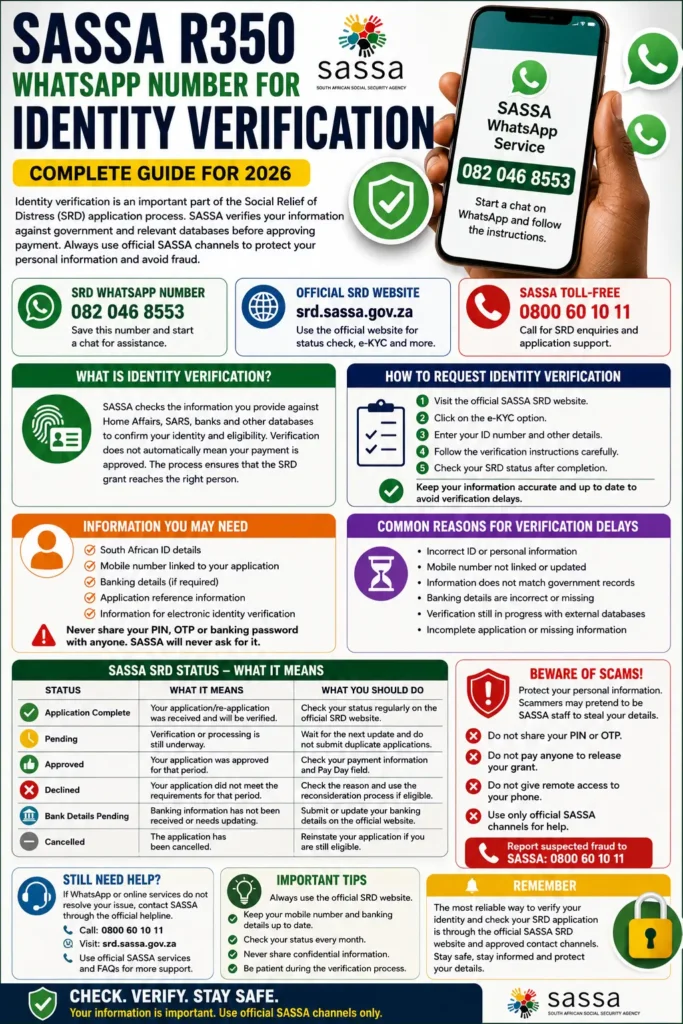
Many applicants search for phrases such as “Request Identity Verification for SASSA R350 WhatsApp Number” because they want to confirm their identity, check an application, or resolve a verification problem. However, applicants should be careful when using WhatsApp numbers shared on social media or unofficial websites. Always compare information with SASSA’s official channels before submitting your ID number, banking information or other personal details.
What Is SASSA R350 Identity Verification?
Identity verification is part of the process used to confirm that the information supplied by an SRD applicant is genuine and belongs to the correct person. SASSA’s SRD consent documentation explains that information can be verified against government and other relevant databases, including Home Affairs, SARS, banking institutions and other sources.
You can also read: SRD Payment Dates for September 2026
This means that an applicant may see a verification-related status even after submitting an SRD application. Identity verification does not automatically mean that payment has been approved. SASSA still has to complete the relevant eligibility and monthly verification checks before an application can be approved for a particular period.
SASSA R350 WhatsApp Number for Identity Verification
The WhatsApp number commonly associated with SASSA SRD assistance is 082 046 8553. If you choose to use a WhatsApp service, first make sure that the number and instructions are consistent with information provided through official SASSA channels.
For the most reliable route, applicants should use the official SRD website for application-status and e-KYC services. The official portal currently provides separate options for Application Status, e-KYC, changing mobile details and changing banking details.
Important Contact Information
| Service | Information |
|---|---|
| SRD WhatsApp number | 082 046 8553 |
| Official SRD website | srd.sassa.gov.za |
| e-KYC | Available through the official SRD website |
| SASSA toll-free number | 0800 60 10 11 |
| SRD application/status services | Official SASSA SRD portal |
SASSA’s official information also lists 0800 60 10 11 as its toll-free contact number for assistance with grant information, application problems and other enquiries.
How to Request SASSA Identity Verification
If your SRD application requires identity verification, start with the official SASSA SRD website rather than immediately giving personal information to an unknown WhatsApp contact. The official portal has an e-KYC option specifically presented for applicants who need to check electronic identity verification.
Step-by-Step Process
Follow these basic steps:
- Open the official SASSA SRD website.
- Select the e-KYC option if it is available for your application.
- Enter the requested information accurately.
- Follow the verification instructions shown on the official platform.
- Check your SRD application status after completing the process.
- If the issue remains unresolved, contact SASSA through its official support channels.
Do not submit false information or use another person’s details. SASSA’s application declaration requires information supplied by applicants to be accurate, complete and current.
How to Use the SASSA WhatsApp Service
Applicants who have been instructed to use the SASSA WhatsApp service can save 082 046 8553 and start a WhatsApp conversation. A simple greeting such as “Hi” may begin the automated interaction, after which you should follow the options presented to you.
However, WhatsApp should not be treated as a replacement for the official SRD website. If the WhatsApp conversation asks you to make a payment, send your banking PIN, share an OTP with another person or provide information that does not appear necessary for your SASSA request, stop and verify the service first.
What Information May Be Needed?
SASSA needs accurate personal information to process and verify SRD applications. Its official documentation states that applicant information may be checked against several relevant databases and institutions as part of the verification process.
Depending on the service you are using, you may be asked for information such as:
- South African ID details.
- The mobile number linked to your application.
- Application-related information.
- Banking details when managing payment information.
- Information required for electronic identity verification.
Never share your banking PIN, card PIN or WhatsApp verification code with an individual claiming to be a SASSA agent. A genuine verification process should not require you to hand over confidential banking credentials.
You can also read: Any Failure During NSFAS Verification
Why Is My SASSA Identity Verification Still Pending?
A pending verification status generally means that the relevant checks have not yet been completed. It does not necessarily mean that your application has been rejected.
SASSA’s published SRD status information explains that applications can move through different stages. For example, “Application complete” means the applicant completed the re-application process and will continue to be verified, while a specific period can remain pending while verification is being completed.
Common Reasons for Verification Problems
Several issues can cause an applicant to experience difficulties:
- Incorrect ID or personal information.
- A mobile number that is no longer linked to the application.
- Information that does not match government records.
- Banking information that needs to be updated.
- An incomplete verification process.
- Delays while information is checked against external databases.
If your mobile number has changed, the official SRD website provides a dedicated option for changing the mobile number linked to an application.
SASSA Status Messages You Should Understand
Understanding the status shown on your application can prevent unnecessary confusion. An identity-verification issue and a payment decision are not always the same thing.
| SASSA Status | What It Generally Means | What You Should Do |
| Application Complete | Your application/re-application was received and will be verified | Check status regularly |
| Pending | Verification or processing is still underway | Wait for the next update |
| Approved | The application was approved for that period | Check payment information |
| Declined | The application did not meet the requirements for that period | Check the reason and appeal if eligible |
| Bank Details Pending | Banking information has not been received | Submit or update banking details |
| Cancelled | The application has been cancelled | Reinstate it if you are still eligible |
SASSA’s official status guide says applicants with an approved period should check the payment-day field, while applicants whose period is declined can use the relevant reconsideration process if they believe the decision is incorrect.
How to Check SASSA SRD Status After Verification
After completing the relevant verification steps, you can return to the official SRD website and use the Application Status service. This is the safest way to determine whether your application is still pending, approved, declined or affected by another issue.
Remember that approval for one month does not necessarily guarantee payment for every future month. SRD applications can be subject to ongoing verification, so beneficiaries should check their status when they need confirmation about a particular payment period.
What to Do If Your Identity Verification Fails
If your identity verification does not succeed, do not immediately submit a second application. First check whether the information on your existing application is correct and whether SASSA has provided a specific reason or instruction.
You should also check whether your mobile number and banking details are correctly linked. The official SRD portal provides separate services for changing both mobile details and banking details.
Before Contacting SASSA
Have the following information available:
- Your South African ID details.
- The mobile number used for the SRD application.
- Your application information or reference details, where available.
- Any message or status displayed during verification.
- Relevant banking information if your issue concerns payment details.
Providing accurate information can make it easier for SASSA to identify the application and understand the problem.
Beware of Fake SASSA WhatsApp Numbers
One of the biggest risks for SRD applicants is sharing personal information with scammers. Search results and social-media posts can contain old, unofficial or misleading contact information, so applicants should not assume that every number described as a “SASSA WhatsApp number” is genuine.
SASSA itself advises beneficiaries to report suspected grant fraud and provides its official toll-free number for grant enquiries and fraud-related assistance.
Never Share These Details With a Stranger
Avoid giving an unknown person:
- Your bank PIN.
- Your card PIN.
- Your online banking password.
- An OTP received from your bank.
- Your WhatsApp verification code.
- Remote access to your phone.
- Money to “activate” or “release” an SRD payment.
SASSA SRD applications and official services should not require you to pay an agent to unlock a grant. If someone promises guaranteed approval in exchange for money, treat it as a warning sign.
Official SASSA Help if WhatsApp Does Not Work
If you cannot resolve the identity-verification problem through the available online services, use SASSA’s official support channels. The SASSA FAQ identifies 0800 601 011 as the toll-free helpline for information about payment dates, grant qualification rules, district offices and help with application problems.
You can also read: Deano Van Rooyen Leaves Orlando Pirates
The official SRD website is also the preferred place to check application status, access e-KYC, change linked mobile details and manage banking details.
Frequently Asked Questions
What is the SASSA R350 WhatsApp number?
The number commonly cited for the SASSA SRD WhatsApp service is 082 046 8553. Before sharing sensitive information, applicants should verify the service through official SASSA channels.
Can I request identity verification through WhatsApp?
WhatsApp may provide assistance or guide users through available services, but the official SRD website currently provides a dedicated e-KYC option for electronic identity verification.
Does identity verification mean my SRD payment is approved?
No. Identity verification is only one part of the process. SASSA can continue checking eligibility and other information before approving payment for a particular period.
What if my SASSA status says pending?
A pending status generally means the relevant processing or verification has not been completed. Continue checking the official SRD status service for updates rather than submitting unnecessary duplicate applications.
What should I do if my mobile number changed?
Use the Change Mobile Number service on the official SRD website. SASSA’s declaration also states that applicants should keep their contact information current.
Can someone charge me to verify my SASSA application?
Be extremely cautious. Do not pay an unofficial agent to verify, approve or release your SRD payment. If you suspect fraud, contact SASSA through its official channels.
Conclusion
The “Request Identity Verification for SASSA R350 WhatsApp Number” search is mainly relevant to applicants trying to resolve an SRD identity or verification issue. The key point is that you should use the official SASSA SRD website and its e-KYC and Application Status services whenever possible.
The WhatsApp number 082 046 8553 may be useful for applicants seeking WhatsApp-based assistance, but always verify current contact details before sharing personal information. For additional assistance, SASSA’s official toll-free number is 0800 60 10 11.
Official SRD portal: SASSA SRD Website
Official SASSA services: SASSA Services and FAQs
