National Student Financial Aid Scheme Payment Dates Check Online
If you are waiting for your NSFAS allowance and not sure when the money will come, you are not alone. Thousands of students across South Africa ask the same question every month: When is NSFAS paying this month, and how do I check online?
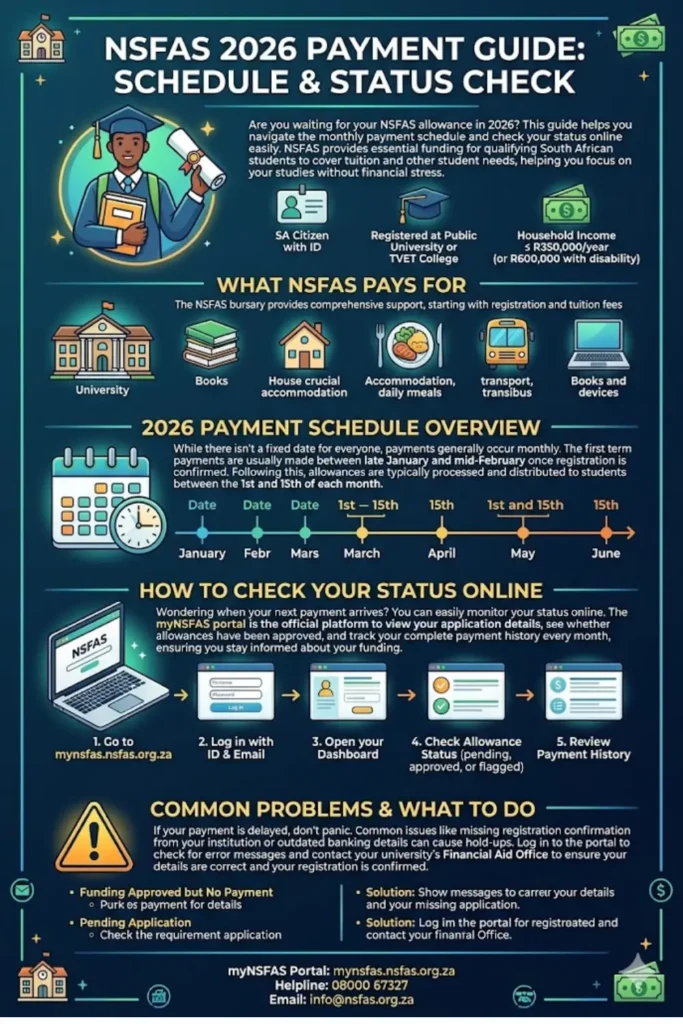
This guide gives you everything you need. You will find the 2026 payment schedule, a step-by-step process for checking your status on the myNSFAS portal, and what to do if your payment is delayed or your funding shows a problem.
When does NSFAS pay allowances in 2026?
NSFAS pays student allowances on a monthly basis, usually between the 1st and 15th of each month, depending on your institution. Tuition and registration fees go directly to your university or TVET college. Transport, meal, accommodation, and learning material allowances are paid to students via NSFAS Wallet (through Tenet or Hello Paisa/Student Hub). You can check your payment status at mynsfas.nsfas.org.za using your ID number and registered email address.
NSFAS 2026 Payment Overview at a Glance
| Detail | Information |
|---|---|
| Scheme Name | National Student Financial Aid Scheme (NSFAS) |
| Type of Funding | Bursary (non-repayable for qualifying students) |
| Who Qualifies | SA citizens, household income below R350,000/year |
| Disability Income Threshold | Up to R600,000 household income per year |
| Tuition Payment | Paid directly to institution |
| Allowances Paid To | Students via NSFAS Wallet / institution system |
| Allowance Payment Window | Generally 1st – 15th of each month |
| Check Status Online | mynsfas.nsfas.org.za |
| NSFAS Helpline | 08000 67327 (toll-free) |
| Email Support | info@nsfas.org.za |
| Twitter/X | @myNSFAS |
What the National Student Financial Aid Scheme Pays in 2026
Before checking payment dates, it helps to know what NSFAS covers. For students registered at accredited public universities and TVET colleges, NSFAS bursaries may include the following:
- Tuition fees – paid directly to your institution
- Registration fees – covered as part of the bursary
- Accommodation allowance – for students in approved off-campus housing or on-campus residences
- Meal allowance – for food and daily nutrition
- Transport allowance – for students who live within a certain distance off campus
- Learning materials allowance – covers books, study devices, and resources
- Personal care allowance – for students in catered residences
These allowances are not paid as a lump sum at the start of the year. They are distributed monthly through your institution’s approved payment system or directly via the NSFAS Wallet.
You can also read: SASSA SRD R370 Status Appeals Process
When Are NSFAS Allowances Paid in 2026?
NSFAS does not publish one fixed date for all students. Payment timing depends on your institution and when your registration is confirmed and your funding approved.
Here is what typically happens:
January/February (Start of Year)
Allowances for the first academic term are processed after registration closes. Expect your first payment between late January and mid-February, once your institution confirms your registration with NSFAS.
March – November (Monthly Payments)
After the first payment is processed, monthly allowances usually arrive between the 1st and 15th of each month. Some universities pay earlier in the month; TVET colleges may differ.
Mid-Year (July – August)
Students who register for the second semester must have their registration confirmed again. There can be delays at this point if your academic progression was not met.
December
Most institutions close the academic year. NSFAS payments typically stop after the final month of the academic term.
How to Check Your NSFAS Payment Status Online (Step by Step)
Checking your NSFAS status online is straightforward if you have your ID number and the email address you registered with. Follow these steps:
Step 1: Go to the Official NSFAS Portal
Open your browser and go to mynsfas.nsfas.org.za. This is the only official platform. Do not use any unofficial websites or WhatsApp groups claiming to check NSFAS status.
Step 2: Click “Log In” or “Register”
If you have used the portal before, click “Log In.” If this is your first time, click “Register” and create an account using your 13-digit South African ID number and a valid email address.
Step 3: Enter Your Login Details
Use the email address and password you registered with. If you forgot your password, click “Forgot Password” and follow the reset instructions sent to your email.
Step 4: Open Your Dashboard
Once logged in, your dashboard shows your funding status, application details, and allowance information. Look for the section labelled “My Applications” or “My Funding.”
Step 5: Check Your Allowance Status
Your dashboard will show whether your allowances are approved, pending, or flagged. You can see which allowances are active (for example, meal allowance or transport allowance) and whether a payment has been processed.
Step 6: Check Payment History
Look for a “Payment History” or “Transactions” tab. This shows you dates and amounts for all payments processed to your account.
Step 7: Update Your Details If Needed
If your contact information, banking details, or ID information is outdated, update it on the portal. Wrong details cause payment delays.
Step 8: Contact NSFAS If Your Status Shows a Problem
If you see an error, a hold, or a status you do not understand, call the NSFAS helpline at 08000 67327 (toll-free) or email info@nsfas.org.za.
NSFAS Funding at the University of Johannesburg (UJ)
If you study at the University of Johannesburg, your experience with NSFAS will also involve UJ’s Financial Aid and Bursary Offices, which are located on all UJ campuses.
UJ works directly with NSFAS to:
- Confirm student registrations so allowances can be processed
- Manage accommodation placements for NSFAS-funded students
- Assist with funding queries and appeals
- Support students whose funding is under review
Important for UJ Students: You must apply separately for NSFAS funding and for admission to UJ. These are two different applications. If you only applied to one and not the other, your funding will not be processed.
Once NSFAS approves your funding and UJ confirms your registration, allowances will start flowing. UJ also allows qualifying students to attend classes while funding processes are being finalised, though this is subject to the university’s own rules.
Who Qualifies for NSFAS Funding in 2026
To receive NSFAS funding at a public university or TVET college, you must meet the following requirements:
Citizenship
- Must be a South African citizen with a valid ID document
- Must be registered at a public university or TVET college
Income Threshold
- Your household combined annual income must be R350,000 or less
- If you have a disability, your household income threshold rises to R600,000 per year
Academic Requirements
- First-time students must meet the minimum admission requirements of their institution
- Returning students must meet academic progression rules each year
- You must not have exceeded the maximum funded years of study allowed by NSFAS
Automatic Qualification Students who receive SASSA grants such as the Child Support Grant, Foster Child Grant, or Disability Grant usually qualify for NSFAS automatically, provided they register and meet academic requirements.
You can also read: NSFAS Payment Dates 2026 Second Semester
Common NSFAS Payment Problems and What to Do
Sometimes your payment does not arrive on time or your portal shows a problem. Here are the most common issues and practical steps to fix them:
“Funding Approved but No Payment Yet”
This usually means your institution has not yet confirmed your registration with NSFAS. Contact your university’s Financial Aid Office and ask them to confirm your registration on the NSFAS system.
“Application Pending” for Too Long
Applications can sit in “pending” status if your supporting documents are incomplete. Log in to myNSFAS and check if NSFAS has sent you a request for additional documents.
“Allowance Not Reflecting”
Your allowance may have been processed but is sitting in your NSFAS Wallet. Check whether you have activated your wallet or whether your institution uses a different payment method.
“Academic Progression Not Met”
If you did not pass enough modules in the previous year, NSFAS may flag your account. You will need to appeal through your institution’s financial aid office with supporting documents.
“Identity Verification Failed”
This happens when your ID details on the NSFAS system do not match Home Affairs records. You may need to visit a Home Affairs office with your original ID document and then follow up with NSFAS.
Banking Details Not Updated
If you changed your bank account or are using a new Capitec, FNB, ABSA, Standard Bank, or Postbank account, update your details immediately on myNSFAS. Payments sent to a closed account will be delayed.
How to Appeal a Declined NSFAS Application
If NSFAS declined your application, you have the right to appeal. Here is how:
Step 1: Log in to mynsfas.nsfas.org.za
Step 2: Find the declined application and look for an “Appeal” button
Step 3: Select the reason for your appeal from the options given
Step 4: Upload any supporting documents (proof of income, medical certificates if applicable, etc.)
Step 5: Submit your appeal
Step 6: Check your portal regularly for a response, usually within 30 days
You can also visit your institution’s financial aid office. They can assist you with the appeals process and guide you on what documents to include.
Frequently Asked Questions About NSFAS Payments
When exactly does NSFAS pay allowances each month in 2026?
There is no single payment date that applies to all students. Payments are processed between the 1st and 15th of each month, depending on your institution and when your registration is confirmed. Check your myNSFAS dashboard for your specific payment history.
How do I check my NSFAS status without a laptop?
You can use your smartphone to visit mynsfas.nsfas.org.za on your mobile browser. The site is mobile-friendly. You can also contact NSFAS on 08000 67327 (toll-free) or send an email to info@nsfas.org.za.
Why is my NSFAS allowance late this month?
Late payments are usually caused by registration not being confirmed by your institution, outstanding documents, banking detail errors, or an academic progression review. Log in to your portal and check your status, then contact your university’s Financial Aid Office.
Can SASSA grant recipients apply for NSFAS?
Yes. If you receive a SASSA Child Support Grant, Disability Grant, or Foster Child Grant, you may qualify for NSFAS automatically. You still need to apply and register at a qualifying institution.
My NSFAS Wallet shows a balance but I cannot access the money. What do I do?
Some students have had issues accessing NSFAS Wallet funds. Contact your institution’s financial aid office first, then follow up with NSFAS on 08000 67327.
Does NSFAS pay for accommodation off campus?
Yes, but only for approved off-campus accommodation. Your landlord or student housing provider must be registered with your institution. Check with your accommodation office to confirm whether your place qualifies.
Can I apply for NSFAS mid-year?
NSFAS applications typically open at the start of the year. If you missed the application window, contact your institution’s financial aid office. In some cases, late applications are considered, especially if circumstances changed.
What happens if I fail too many modules?
If you do not meet academic progression requirements, NSFAS may place your funding on hold or stop it entirely. You can appeal through your institution with supporting motivation. Act quickly, as delays make the process harder.
Is NSFAS free or do I pay it back?
For qualifying students (household income below R350,000 per year), NSFAS funding is a bursary and does not need to be repaid, provided you meet academic and funding conditions each year.
Where do I report NSFAS-related scams?
NSFAS never charges fees or asks for payment to process your application. If someone contacts you asking for money to “speed up” your NSFAS application, it is a scam. Report it to NSFAS on 08000 67327 or to the South African Police Service.
