SASSA SRD Phone Number Common 2026 Errors and Troubleshooting
Updating your phone number for the SASSA SRD R370 grant is important, but many people face errors during the process. These issues can delay verification, block OTPs, or prevent updates altogether. This guide explains the most common problems in 2026 and how to fix them بسهولة (easily) without confusion.
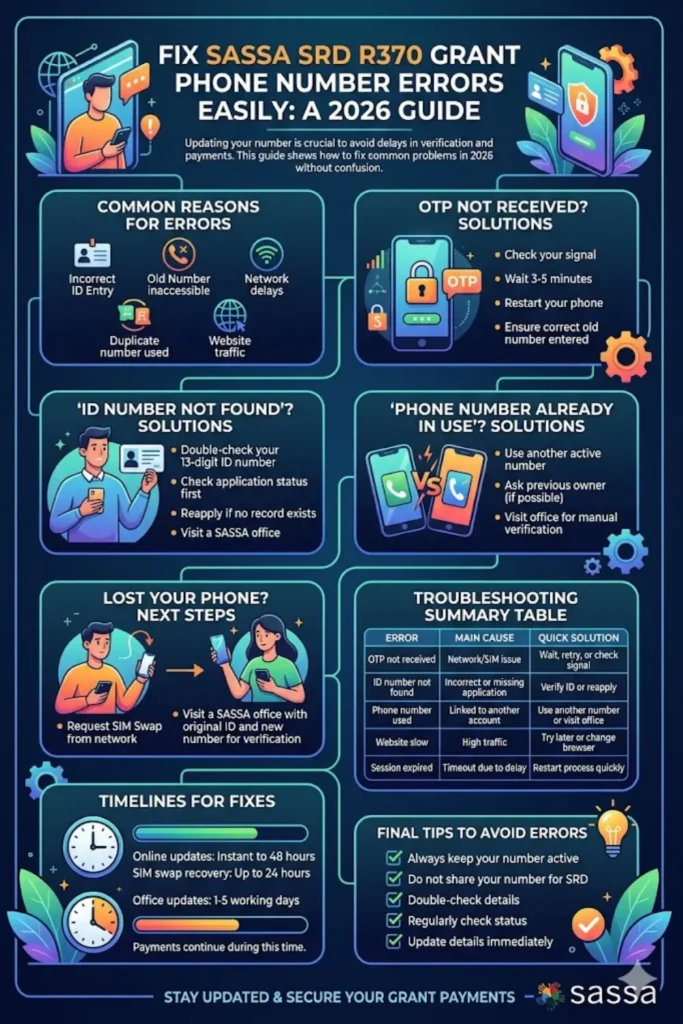
The goal is simple: help you keep your SRD application active and ensure you continue receiving updates and payments without interruption.
Why Phone Number Errors Happen on SASSA SRD
Phone number issues usually happen because of system limitations, incorrect details, or network problems. Since SASSA uses your number for OTP verification and communication, even a small mistake can cause failure.
Many users also face problems when they change SIM cards, lose access to their old number, or enter incorrect ID details during the update process.
Common reasons include:
- Incorrect ID number entered
- Old phone number not accessible
- Network delays affecting OTP delivery
- Duplicate phone number already linked to another account
- Temporary website issues during peak hours
Understanding the cause makes it much easier to fix the issue quickly.
You can also read: FSCA Wealth Management Learnership Programme
OTP Not Received – Causes and Solutions
One of the most frequent problems is not receiving the OTP (One-Time Pin). Without it, you cannot verify or change your phone number online.
This usually happens due to network delays, SIM issues, or incorrect number entry. Sometimes, the system itself may take time to send the code.
How to fix OTP issues:
- Check your mobile signal and ensure your phone has network coverage
- Wait at least 3–5 minutes before requesting a new OTP
- Restart your phone and try again
- Make sure you entered the correct old phone number
- Avoid multiple rapid requests (this can block OTP temporarily)
If your SIM is no longer active, the online method will not work. In that case, visiting a SASSA office is the only reliable solution.
“ID Number Not Found” Error Explained
This error appears when the system cannot find any SRD application linked to your ID. It can be confusing, especially if you already applied before.
In most cases, it is caused by typing mistakes or applying with different details previously.
Possible reasons:
- Typo in your 13-digit ID number
- No SRD application submitted yet
- Application was declined or removed
- System delay in updating new applications
What you should do:
- Double-check your ID number carefully
- Try checking your application status first
- Reapply if no record exists
- Visit a SASSA office if the issue continues
“Phone Number Already in Use” Problem
SASSA allows only one phone number per application. If your new number is already linked to another person’s application, the system will block it.
This often happens when numbers are recycled by mobile networks and reassigned to new users.
How to resolve this issue:
- Use a different active phone number
- Ask the previous owner (if known) to remove it
- Visit a SASSA office for manual verification
This issue cannot always be solved online, especially if ownership conflicts exist.
Website Errors and Slow Loading Issues
The SASSA SRD website can become slow or unresponsive, especially during busy times like payment announcements or status updates.
This is not a user error but a system overload problem.
Common website issues:
- Pages not loading
- “Session expired” message
- Buttons not responding
- Long waiting time
Simple fixes:
- Try accessing the site during off-peak hours (late morning or afternoon)
- Clear your browser cache and cookies
- Use a different browser (Chrome, Firefox, etc.)
- Avoid using outdated devices or slow internet
Patience is important here, as the system usually returns to normal after peak traffic reduces.
You can also read: University of Cape Town South Africa Scholarships
Lost Phone or SIM – What You Should Do
Losing your phone is one of the biggest challenges because you cannot receive OTPs anymore. Without OTP access, online updates are impossible.
Your first step should always be trying to recover your number through your mobile provider.
Steps to follow:
- Request a SIM swap from your network provider
- Insert the new SIM and test if it works
- If recovery fails, visit a SASSA office
At the SASSA office, bring:
- Your original ID document
- A new active phone number
- Affidavit (if ID or SIM was also lost)
This method ensures your identity is verified securely.
Troubleshooting Summary Table
| Error Message | Main Cause | Quick Solution |
|---|---|---|
| OTP not received | Network/SIM issue | Wait, retry, or check signal |
| ID number not found | Incorrect or missing application | Verify ID or reapply |
| Phone number already in use | Number linked to another account | Use another number or visit office |
| Website not loading | High traffic | Try later or change browser |
| Session expired | Timeout due to delay | Restart process quickly |
How Long Fixes Usually Take
Most issues can be resolved quickly if handled correctly. However, the time depends on the method you use.
Online fixes are usually instant but may take up to 48 hours in some cases. Office visits may take a few working days to fully reflect in the system.
Estimated timelines:
- Online updates: Immediate to 48 hours
- SIM swap recovery: Up to 24 hours
- Office updates: 1–5 working days
During this time, your grant payments continue as normal.
Final Tips to Avoid Future Errors
Avoiding problems is always better than fixing them later. Keeping your information updated and accurate can save you time and stress.
Best practices:
- Always keep your phone number active
- Do not share your number with others for SRD use
- Double-check all details before submitting
- Regularly check your SRD status online
- Update your details immediately if anything changes
Staying proactive ensures you never miss important updates or payments.
You can also read: South African Social Security Agency Status
Conclusion
SASSA SRD phone number errors in 2026 are common, but most of them have simple solutions. Whether it’s an OTP issue, incorrect ID entry, or a lost SIM, each problem can be fixed by following the correct steps.
The key is to understand the issue, act quickly, and choose the right method—online or in person. By keeping your details accurate and updated, you can avoid delays and continue receiving your SRD grant without interruption.
